Kaplan Test of English (China) Guidance and Instructions
This page contains important information about Kaplan Test of English (China). You must read all the information below before you follow the included instructions to complete your test.
📢 Important: All candidates in China, as well as Chinese nationals living inside and outside of China must book a test slot in advance. You will not be able to take the test without a confirmed test slot. Details on how to book will be sent to you by email after you purchase a test.
A. About the Test
What is Kaplan Test of English?
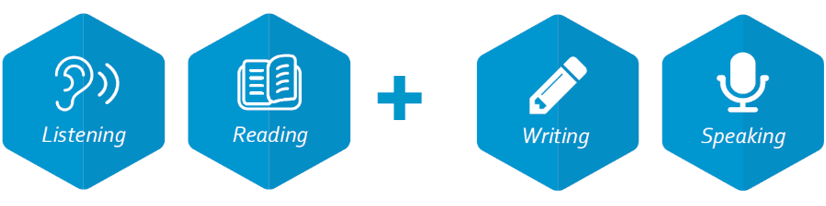
Kaplan Test of English is an adaptive online test that assesses your level of English language proficiency in different skills. During the Listening and Reading sections of the test your ability is continuously estimated. The test chooses items based on how you answered the previous question and updates that estimate until it is accurate.
Listening and Reading
- During the Listening and Reading sections of the test, you may be asked to listen to conversations and read various text types, before answering multiple choice questions.
- These sections do not have a timer. They will end when the testing system has enough information about your English level. On average, it takes slightly over an hour to complete both the Listening and Reading sections.
Writing and Speaking
- For the Writing test you’ll have 35-40 minutes to read and respond to the on-screen task, which typically draws on common and relatable topics while encouraging you to engage with abstract ideas. You may be asked to produce your response in formats such as emails or essays, which will be assessed by our human grading team.
- The Speaking test is timed and takes around 10 minutes. You’ll be given a series of tasks which may require you to answer questions, describe images, or give a presentation. You’ll have a short time to read the task and prepare your answer before you record your response, which will be assessed by our human grading team.
What is Tencent Meeting?
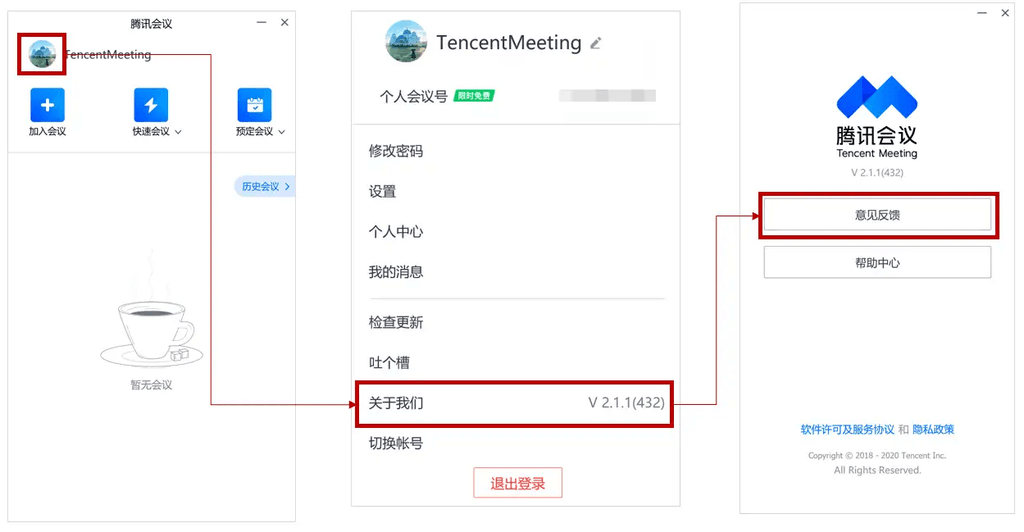
Your test will be monitored live by an Exam Conduct Officer (Proctor), using Tencent Meeting, a video calling software application that is used to ensure test security and detect cheating.
At least 24 hours before the scheduled test time you will be emailed the link to join your ‘Tencent Meeting’ call. You can find the guidelines for logging into Tencent Meeting here.
During your test, you will be required to share your screen with the proctor, and capture a video of you while you are taking the test on two separate cameras:
- Your webcam will be positioned in front of you to record your full face and head.
- A secondary camera (on your mobile phone) will be positioned at your side to record your computer screen, keyboard, the desk/tabletop and your upper body profile (waist to head including hands).
Your personal information and video feed will only be viewed by Kaplan Test of English administrators and will only be used to determine whether your assessment results are valid.
📢 Important: Chinese nationals taking the test outside mainland China will need to join the Tencent Meeting session via Voov Meeting. Ensure you follow the correct instructions based on your test location.
B. Before You Take the Test You Need To:
1. Check That Your Setup Meets Test Requirements
Check this list of necessary equipment and technical specifications before starting the test.
Valid identification
You will need to have your current passport or national ID ready when taking the test.
Internet connection
You will need a strong and stable internet connection (Cable modem, DSL or better) with minimum 1 Mbps download speed and minimum 1 Mbps upload speed.
Tethering is not allowed as it may result in an unstable connection. We also strongly advise against using corporate or restricted Wi-Fi networks, as these may have limitations and issues that you cannot control, which could disrupt your test.
Please note that the use of any bluetooth devices such as headsets, headphones, microphones, earbuds, keyboard and mouse is not allowed. The use of wired headsets, earbuds or headphones is also strictly prohibited.
Computer
You will need a desktop or laptop computer which has:
Hardware
- At least 2 GB of available hard disk space
- At least 2 GB available RAM
- A modern processor, similar to Intel i3 or better
Software & Operating Systems
- For Mac: macOS Big Sur (11.0) or newer
- For Windows: Windows 10 or 11 (PowerShell must be turned on)
Web Browser
Use one of the following browsers:
- Google Chrome (version 80 or higher)
- Microsoft Edge (version 80 or higher)
- Mozilla Firefox (version 80 or higher)
- Safari 11 or higher is supported, but may have limited compatibility
Note: Safari is supported from version 11 but not recommended. Some features may not work as expected.
Applications
For candidates taking the test in mainland China, your computer must have the following application installed:
- Tencent Meeting Client
For Chinese nationals taking the test outside mainland China, your computer must have the following application installed:
- Voov Meeting
Webcam (primary camera) must:
- Show video in colour
- Be at least 320×240 resolution, 15 frames per second (fps)
- Be placed at or above eye level (not below the screen or inside a keyboard)
- Be a physical built-in or wired external webcam, not a smart device or virtual webcam
Microphone and Speaker
You will need a microphone and speaker to take the test. These can be built into your computer or connected as an external wired device.
Secondary camera
You will need a smart (video-enabled) mobile phone, connected to a stable Wi-Fi network, to use as a secondary camera which will capture a side view of yourself and your workspace.
We strongly recommend using a personal device to take the test. Computers provided by a workplace may have security settings, firewalls, or restricted administrative access that can interfere with the test platform and proctoring software.
If you are borrowing a device from a family member or friend, make sure you have admin access or that the owner is available during your test time to assist with changing settings if needed (they should not be present in the test environment at any other time during your test).
2. Prepare Your Test Environment
You will need to take the test alone, in a quiet, well-lit, and appropriate environment. Follow these guidelines to set up your space:
- Make sure you are alone: Take the test in a private room, no one should be with you or disturb you. Do not use an open or shared space such as a café, library etc.
- Test in a quiet space: Please turn off your music, television or anything that makes loud background noise.
- Remove extra devices: Put devices that you are not using for the test (such as phones, tablets, and smart watches) in another room.
- Take the test in a well-lit room: Your full head and face must remain clearly visible at all times. Check your camera view throughout the test to ensure you stay fully visible. Do not sit with your back to the main light source or a window. Lighting should be directed toward your face so that it is clearly visible on camera.
- Take the test at an appropriate and stable surface such as a table or desk, not a sofa, bed, car etc.
- Keep your test environment as clear as possible with minimal clutter behind or around you.
- Ensure you have enough time: The total test time varies per candidate but typically takes around 1 hour 45 minutes to 2 hours. You cannot pause or take a break during the test. Ensure you have enough time to complete it before starting.
- All personal items must be stored outside the exam room. This includes jackets, coats, scarves, watches, necklaces, caps, hats, and hooded garments. Religious head coverings are permitted. If you require a head covering for medical reasons, you must provide official medical documentation.
3. Prepare Your Equipment
- Check your devices: Make sure all devices you plan to use during the test (e.g., computer, smartphone, microphones, etc.) are switched on, working, and fully charged before logging in. All devices must stay connected for the entire duration of the test.
- Position your webcam: Your webcam must be placed at or above eye level to record your full face and head. If your webcam has a privacy cover, make sure it is open and isn’t covering your camera.
- Position your microphone: If you are using an external microphone, it should be positioned to capture audio clearly throughout the test but should not cover your face or mouth.
- Note-taking is not permitted during the test. All notepads, notebooks, binders, reference books and paper materials must be removed from the workspace before the test begins.
4. Prepare your secondary camera (smartphone):
4.1 For candidates taking the test in mainland China:
- Install the ‘WeChat’ app on your smartphone.
- Check your battery: Your smartphone should be fully charged; we recommend keeping it connected to a power source during the test.
- Connect to the internet: Use a suitable and stable Wi-Fi connection. Do not use mobile data or tethering.
- Disable notifications and set to Airplane mode. Turn off all notifications on your phone, including messaging apps, emails, and calls, to prevent any distractions or disruptions.
- Test your camera placement: You will need to place your phone in landscape orientation (on its side) so that it records a clear side view of your computer screen, keyboard, the desk/tabletop and your upper body profile (waist to head including hands). Before the day of the test, practice your secondary camera setup to ensure you have a suitable space to position your phone. Make sure screen rotation is enabled. On iPhones, turn off Portrait Orientation Lock. On Android devices, turn on Auto-rotate. If this setting is not adjusted, your phone will not record in landscape mode even when placed on its side.
4.2 For candidates taking the test outside of mainland China:
- Install the ‘Voov Meeting’ app on your smartphone.
- You need to have a second ‘Voov Meeting’ account to log into the test with your phone. Therefore, you need to register 2 Voov Meeting accounts before the test day. One with your email and one with your phone number.
- Check your battery: Your smartphone should be fully charged, we recommend keeping it connected to a power source during the test.
- Connect to the internet: Use a suitable and stable Wi-Fi connection. Do not use mobile data or tethering.
- Disable notifications and set to Airplane mode. Turn off all notifications on your phone, including messaging apps, emails, and calls, to prevent any distractions or disruptions.
- Test your camera placement: You will need to place your phone in landscape orientation (on its side) so that it records a clear side view of your computer screen, keyboard, the desk/tabletop and your upper body profile (waist to head including hands). Before the day of the test, practice your secondary camera setup to ensure you have a suitable space to position your phone. Make sure screen rotation is enabled. On iPhones, turn off Portrait Orientation Lock. On Android devices, turn on Auto-rotate. If this setting is not adjusted, your phone will not record in landscape mode even when placed on its side.
5. Read the Test Rules and Regulations
Important! The Exam Conduct Officer will monitor you throughout the test. If you break the rules your test may be invalidated (failed), and you may not receive a test certificate or scores.
- You must not ask the Exam Conduct Officer any questions during the test unless you experience technical difficulties.
- You must dress appropriately, ensuring your body is properly covered throughout the test. Clothing should not be too revealing, such as tops that show the chest area or shirts that leave the upper body uncovered. Please choose clothing that is respectful and suitable for a formal setting.
- You must not use a phone or other electronic device, view another screen, use a dictionary or talk to anyone during your test.
- You must not use your computer for any activities other than taking the test itself. If you need to utilise any online aids or computer settings as part of an additional need requirement, please contact us before taking your test.
- You must not have any pre-made notes. Note-taking is not permitted during the test. All notepads, notebooks, binders, reference books and paper materials must be removed from the workspace before the test begins.
- You must not use AI text generation during your test.
- You must only use one screen during your test. You cannot use multiple displays, mirror/share your computer screen or use remote access applications.
- No one else can be in the test environment during the test.
- Your entire face and mouth must be visible at all times during the test. Please contact us if you need to arrange an exception to this.
- You must not plagiarise, self-plagiarise, or copy from any prompt.
- You must take the test in one sitting; you cannot leave the test or suspend it prior to completion.
- You are not allowed to eat, smoke or vape while taking the test. Any drinks must be in a clear bottle.
- Offensive language or behaviour during your test will not be tolerated and may result in your test attempt being invalidated (failed) and no scores released.
- You must not copy or take images of any part of the test, nor reproduce any part of it.
C. How to Take the Test
Important! You should read the following information in full before following the steps.
1. Join the Tencent Meeting
1.1 For candidates taking the test in mainland China:
At your scheduled time, join the Tencent Meeting video session with the login credentials provided to you. You can find the guidelines for logging into Tencent Meeting HERE.
1.2 For candidates taking the test outside of mainland China:
At your scheduled time, join the Tencent Meeting session via Voov Meeting. Step-by-Step Guide to Join Tencent Meeting via Voov Meeting:
Download Voov Meeting
- Visit the official international website https://voovmeeting.com and download the Windows/macOS application from the “Download” section. You MUST use the app version (not web version) of Voov Meeting, or you will not be able to share your screen.
- Note: Avoid third-party app stores to ensure software authenticity.
Register/Login
Open the installed Voov Meeting application and:
- Click Sign Up to create an account (using your email or mobile number).
Or
- For existing users, select Log In.
Joining a Meeting
- Option A: Direct Link
- Click the meeting link shared by the host (via email). The Voov Meeting application will auto-launch and connect.
- Option B: Manual Entry
- Open Voov Meeting Application.
- Select Join on the homepage.
- Enter the following details:
- Meeting ID.
- Meeting Password.
- Your Passport Name.
- Click Join Now.
Meeting Configuration
- Device Check. Allow permissions for Voov Meeting application for:
- Camera.
- Microphone.
- Screen Sharing.
- Audio/Video Settings:
- Switch microphone/camera on/off using the bottom toolbar icons.
- Test devices in Settings > Audio/Video before joining.
2. Onboarding Checks
Once you have joined the Tencent Meeting, the Exam Conduct Officer will:
- Verify your passport and/or national ID.
- Check your test environment. You will be asked to complete a 360-degree environment check (Room Scan). Move and rotate your external webcam, or your device if using a built-in camera, to complete this.
- Confirm your equipment is working properly.
- Ask you to share your screen.
3. Join With Your Smart Phone (Secondary Camera)
3.1 For candidates taking the test in mainland China:
When prompted by the Exam Conduct Officer, follow their instructions to set up your smart phone as a secondary camera, using the Tencent Meeting mini program in WeChat.
- Open WeChat on your phone.
- Swipe down to access the “Search” function.
- Search for “Tencent Meeting” and select the official mini program.
- Click “Enter a meeting or a webinar”. You may log in as a guest; you do not need to have a second account.
- Enter the same Meeting ID and your Name (use the same name as your computer, e.g., “John Smith – Side”). Leave your video ON, but speaker and microphone OFF.
- Click “Join Now”. Enter the same meeting password.
- Switch your phone to Do Not Disturb mode.
- Position your phone: Place your phone in landscape orientation (on its side) so that it records a clear side view of your computer screen, keyboard, the desk/tabletop and your upper body profile (waist to head including hands). The Exam Conduct Officer (Proctor) will confirm your secondary placement is correct, and provide further guidance if required.
3.2 For candidates taking the test outside of mainland China:
When prompted by the Exam Conduct Officer, follow their instructions to set up your smart phone as a secondary camera, using the VooV Meeting app.
You need to have a second account to log into the test with your phone. Therefore, you need to register 2 VooV Meeting accounts with your email and phone number before the test day.
Step-by-step phone login guidelines:
- Open the VooV Meeting app on your phone.
- Log in with your second personal VooV Meeting account.
- Click “Join a Meeting”.
- Enter the same Meeting ID and your Name (use the same name as your computer, e.g., “John Smith – Side”). Leave your video ON, speaker and microphone OFF.
- Click “Join Now”. Enter the same meeting password.
- Switch your phone to Do Not Disturb mode.
- Position your phone: Place your phone in landscape orientation (on its side) so that it records a clear side view of your computer screen, keyboard, the desk/tabletop and your upper body profile (waist to head including hands). The Exam Conduct Officer (Proctor) will confirm your secondary placement is correct, and provide further guidance if required.
4. Complete Your Test
Once setup is complete, the Exam Conduct Officer will provide a link to the Kaplan Test of English platform.
Click on the link and log in to your Kaplan Test of English account:
- If this is your first time logging in to Kaplan Test of English, the Exam Conduct Officer will provide your login credentials.
- You’ll be prompted to accept the Terms and Conditions, set a new password and enter your email address.
- Your new password must contain at least one of the approved special characters shown on screen. Any other characters are not supported.
- If you have logged in before, use your username and the password you previously created.
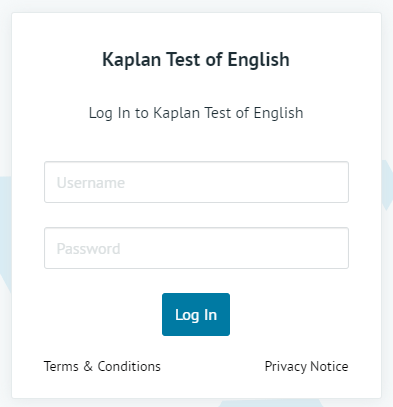
Start your test: Open your test by clicking ‘Start assessment’.
D. Troubleshooting
I logged out or was disconnected in the middle of my test.
- Re-join your live proctoring session as soon as possible. If you are unable to re-join the meeting, please email us at takektechina@kaplan.co.uk.
Problems with Kaplan Test of English
My password doesn’t work
- Make sure there are no spaces before or after your username and password.
If you have forgotten your password or need it to be reset, please speak to your Exam Conduct Officer.
I received an error message during the assessment.
- Please report this to your Exam Conduct Officer (Proctor).
I can’t hear the audio, or the audio is freezing.
- Refresh the page.
- You may have internet connectivity or device problems. Please speak to your Exam Conduct Officer (Proctor), log out of your KTE account, check your internet connection and that any speakers you are using for the test are working, then log back in as soon as possible to continue the assessment from where you left off.
I can’t record audio in the Speaking section.
- Follow the directions in the assessment to allow microphone permission.
I can’t upload my responses in the Speaking section.
- The Speaking section requires the use of consistent and reliable internet to record and upload responses. If you have slow or inconsistent internet connectivity, the recording could take up to a minute to upload successfully. Please only click the submit button once during this time.
If problems continue, please speak to your Exam Conduct Officer (Proctor).
Contact takektechina@kaplan.co.uk for any other issues with Kaplan Test of English.
Problems with Tencent Meeting
For Tencent Meeting customer support, please contact +86 4009-700-700 or access customer support on the Tencent Meeting terminal on your PC by following the below guidance: